Multi-Touch Attribution · Built in HubSpot
Most B2B teams know pipeline is growing — but can't answer the question that matters: which channels and campaigns are actually driving revenue? We build the system that answers that. Inside HubSpot. No third-party tools.
Diagnose my attributionThe Diagnosis
HubSpot's native attribution gives you fragments — credit for the first hand-raise, or the last form fill. Everything in between is invisible. That's where most pipelines break.
The Architecture
A custom attribution engine wired directly into your HubSpot instance. No third-party tools. No data warehouse. No silos to maintain.
Your marketing universe — every channel, sub-channel, and campaign — mapped into a structured taxonomy unique to your business.
FoundationCustom fields that capture both the original acquisition channel and the most recent engagement — first-touch AND last-touch, in one system.
Data LayerEvery meaningful interaction creates a touchpoint record — automatically. A living log of every touch in the buyer journey.
Core EngineAttribution dashboards that connect touchpoints to pipeline and revenue. See which channels and campaigns are actually creating customers.
OutputSee It Wired Up
Click through the touchpoints. This is what your CRM should be tracking — and what most never do.
Contact Record
Live in HubSpot
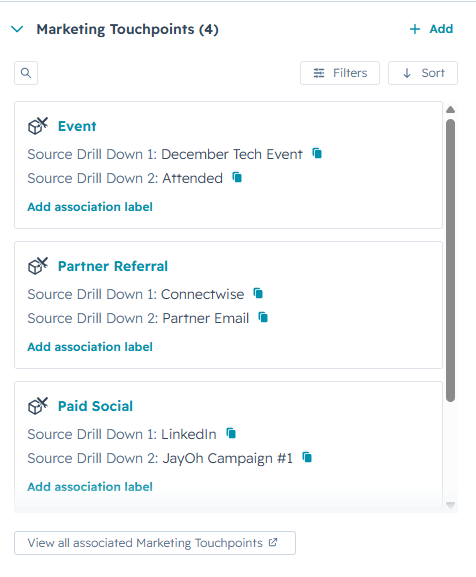
Not a slide. Not a dashboard bolted on top. Every touchpoint becomes a record your team can already filter, sort, and report on — in the contact view, in the touchpoint table, everywhere.

On the contact record
Marketing Touchpoints render directly on the contact record — same panel as Deals, Companies, and Tickets. No new app to learn. No extra tab to remember.
The Approach
HubSpot Campaigns are great for organizing assets around a single launch. Touchpoints are built for measuring the full journey across dozens of channels and campaigns — automatically, in a single consistent format.
HubSpot Campaigns
Built to link emails, landing pages, and ads to a single launch. Works well at launch-scale — breaks down when you're measuring dozens of campaigns in parallel.
JayOh Touchpoints
HubSpot's tracking code already captures source, medium, and UTM data on arrival. We take it from there — writing a touchpoint to the contact automatically. List imports fire the same workflow. Same system, every channel.
The touchpoint layer is what makes attribution actually reportable at scale. Campaigns stay for what they're good at; touchpoints do the measuring.
What You Get
The system is the engine. These are the outcomes it drives.
See exactly which channels generate pipeline and revenue — not just leads. Make budget decisions with conviction.
Every touchpoint in a contact's path from first visit to closed-won. No more blind spots between marketing and sales.
Drill into which specific campaigns, assets, and content pieces actually influenced deals — not just who clicked first.
Attribution dashboards executives and investors trust. No more "we think organic is working." Show the receipts.
No third-party tools. No data warehouse. Everything lives inside the CRM where your team already works.
New channels, new campaigns, new touch types — the system adapts. Built for teams that are growing, not standing still.
How We Deliver
We handle the architecture, the build, the QA, and the training. You get a working system — and a team that knows how to use it.
Map your channels, define your taxonomy, align on what "attribution" actually means for your business.
Custom fields, workflows, custom objects, and automation — engineered inside your HubSpot instance.
Rigorous testing across acquisition paths, re-enrollment logic, and edge cases — before anything goes live.
Deploy to production, build dashboards, and train your team to interpret and act on the data.
Ready When You Are
Let's build the attribution system your growth team deserves — and your CFO will quote back to you.
Book a Discovery Call