If your revenue dashboard can't survive one follow-up question, leadership will go with instinct. That isn't a discipline problem, it's a trust problem. Here's how to fix the inputs so the numbers hold up when someone pushes on them.
Start with the 2-minute trust score
This guide expands one LinkedIn post into a working playbook. Read the original first; every section below builds on its language.
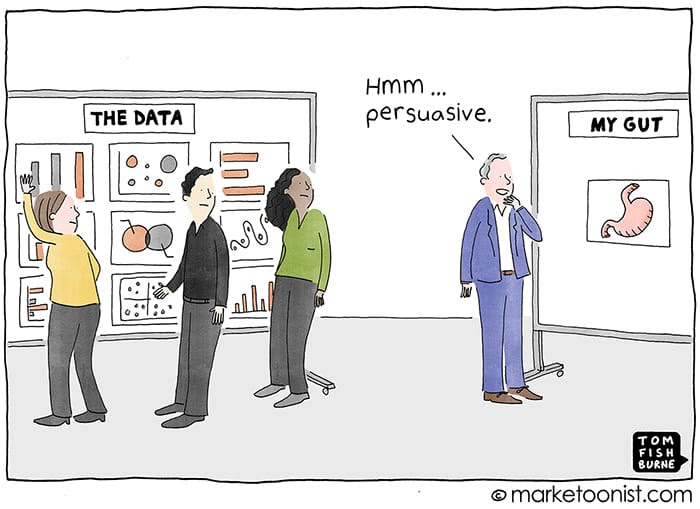
Your leadership team ignoring the dashboard isn't a discipline problem. It's a trust problem.
I've sat in the QBR where someone walks through twelve charts and the CEO makes the call on instinct anyway. Everyone blames the exec. Wrong read.
Gut wins when the data can't survive one follow-up question.
"Why is pipeline down?" Three people give three numbers. "Which channel drove that?" Attribution breaks because half the deals have no source. "Is that real, or did we change the stage definition in March?" Nobody knows.
After two rounds of that, instinct is the rational choice. At least it's consistent.
Most teams respond by building more reporting. That's backwards. The fix is upstream:
One definition of a qualified opportunity that every team actually uses. Required fields enforced at the point of entry, not cleaned up in a spreadsheet later. Stage criteria tied to buyer behavior, not rep optimism. One source of truth everything else reads from.
Then cut the dashboard down to the five numbers that change a decision. If a chart doesn't change what someone does on Monday, it's decoration.
Trusted data doesn't beat instinct by being prettier. It beats it by holding up when someone pushes on it.
Fix the inputs. The dashboards take care of themselves.
Joe LaGrutta, Founder, JayOh
Leaders don't ignore dashboards because they hate data. They ignore them because the numbers fall apart under the first follow-up question.
Marketing counts anything that hits a stage. Sales counts what reps believe. Finance counts what has an amount and a close date this quarter. Every number is right inside its own logic, so none of them is useful in the room.
If source can be blank when a deal is created, it will be. Then someone backfills it in a spreadsheet before the board meeting. That attribution can't be reproduced next quarter, so nobody believes it this quarter.
A trend line is only honest if it measures the same thing each period. Unlogged changes to stages, filters or qualification rules turn every quarter-over-quarter comparison into an argument.
When "Proposal" means the rep feels good, stage-weighted pipeline is a mood ring. Stage criteria have to be buyer actions you can verify, or forecast math sits on sand.
Each failed QBR produces another report, so the exec dashboard grows to 20 or 30 tiles. Nobody can defend 30 numbers in 30 minutes. Volume hides the four inputs that are actually broken, and Validity found nearly a third of teams already spend six or more hours a week reconciling data.
Trust is measurable. Grade the six inputs below. If any of them is weak, fix it before you build another chart.
| Input behind the dashboard | Weak | Acceptable | Strong |
|---|---|---|---|
| Definitions of "qualified opportunity" in use | 3 or more | 2, reconciled monthly | 1, signed by CRO, CMO and CFO |
| Open opportunities with source populated | Under 70% | 70 to 94% | 95% or more |
| Stage-required fields complete on open deals | Under 80% | 80 to 97% | 98% or more, enforced at entry |
| Open deals with a close date in the past | Over 15% | 5 to 15% | Under 5% |
| Charts on the exec dashboard | 20 or more | 10 to 19 | 5 to 9, each tied to a decision |
| Exec KPIs in a dictionary with an owner | Under 50% | 50 to 99% | 100%, versioned |
| Hours a week spent reconciling numbers | 6 or more (nearly a third of teams) | 2 to 5 | Under 1 |
Thresholds are JayOh operating benchmarks from 2026 RevOps delivery work. The reconciliation-hours figure for the weak column comes from Validity, State of CRM Data Management in 2026. The context stats above come from Precisely and Drexel LeBow (2025 Outlook), Salesforce State of Sales (2024), the Salesforce and Tableau leader survey (2025), and Validity (2026). Gartner estimates poor data quality costs organizations $12.9M a year on average (2020).
Work upstream to downstream: decisions, definitions, enforcement, history, and only then the dashboard. Each step names the exact HubSpot or Salesforce object, property or rule to use.
What
List the 5 to 8 decisions the exec team actually makes each week, month and quarter, like hiring, spend shifts and forecast calls.
Why
A chart without a decision attached is decoration. This list becomes the filter for everything you build next.
Exactly how
What
One sentence of entry criteria, signed by the CRO, CMO and CFO. Not a thumbs-up in Slack, a signature.
Why
This kills "three people, three numbers." Every pipeline, conversion and attribution metric inherits from this one definition.
Exactly how
What
One entry per exec KPI: definition, formula, grain, filters, source object and property, owner, steward, version and effective date.
Why
"Is that real or did we change it?" is answered in seconds when every number has a versioned definition and a named owner.
Exactly how
What
Make the fields every metric depends on impossible to skip at the stage where they first matter.
Why
Cleanup in a spreadsheet is a recurring tax. Enforcement at entry is a one-time build that keeps paying.
Exactly how
What
Rewrite each stage's exit criteria as an action the buyer took that you can verify.
Why
Stage-weighted pipeline is only as honest as the stage. Buyer actions are auditable; rep optimism isn't.
Exactly how
What
Every opportunity gets a source the moment it exists, inherited from the contact where possible and required where not.
Why
"Which channel drove that?" only has an answer if source coverage is above 95%. Backfilling later is how attribution loses credibility.
Exactly how
What
Pick the system of record for each metric, snapshot pipeline weekly, and log every definition change with an effective date.
Why
Two systems that both "own" pipeline will never agree. History makes trend lines defensible.
Exactly how
What
Qualified pipeline created vs target, pipeline coverage for this quarter and next, win rate on qualified, forecast vs commit, and sales cycle length.
Why
If a chart doesn't change what someone does on Monday, it's decoration. Five numbers can be defended in one meeting.
Exactly how
What
Before the next QBR, ask the post's three follow-ups of every number: why did it move, which channel drove it, and is it real or a definition change.
Why
That's how you prove the fix worked. Weekly monitoring keeps it working after the project ends.
Exactly how
Most of the gap comes from discipline at the input layer, not from tooling.
A new BI layer on top of the same inputs reproduces the same argument with better colors.
Cost: weeks of build, zero trust gained.
Reps pick the first option to get past the gate, and completeness looks perfect while the data is noise.
Cost: false confidence, which is worse than a known gap.
Conversion rates shift overnight and nobody can tell real change from a moved goalpost.
Cost: broken trend lines and lost credibility with the board.
The board deck number can't be rebuilt next quarter, so the CFO stops quoting it.
Cost: attribution nobody will defend, and budget decisions made on instinct.
HubSpot and Salesforce disagree, and RevOps spends Fridays reconciling instead of improving anything.
Cost: 6+ hours a week, the level Validity found at nearly a third of teams.
The dashboard serves one exec's habit instead of the decisions the team has to make.
Cost: decoration that crowds out the five numbers that matter.
Enter your honest numbers. The score weights the six inputs from the benchmark table, runs the post's three follow-up questions, and names your weakest link. Example values are loaded so you can see a real result.
Loading.
Start with the template for your five numbers. If you want the full audit done from your own exports, download the free Claude skill.
One entry per exec KPI. Paste it into your shared doc and fill in one block per number.
METRIC DICTIONARY ENTRY (copy once per KPI)
--------------------------------------------
Metric name:
Plain-language definition (one sentence):
Formula:
Grain (weekly / monthly / quarterly):
Filters and exclusions:
Source object + property (HubSpot or Salesforce):
System of record:
Business owner (one person):
Data steward:
Decision this number changes:
Decision maker + cadence:
Version + effective date:
Change log (date, what changed, approved by):

THE FIVE-NUMBER EXEC DASHBOARD
------------------------------
1. Qualified pipeline created vs target  (on Qualified Date)
2. Pipeline coverage, this quarter + next
3. Win rate on qualified opportunities
4. Forecast vs commit
5. Sales cycle length on won deals
+  Data-trust tile: open exceptions
   (missing source, past close date, stage-required blanks)

FOLLOW-UP-QUESTION TEST (run before every QBR)
----------------------------------------------
[ ] Why did it move? One definition, current close dates
[ ] Which channel drove it? Source on 95%+ of open deals
[ ] Real or a definition change? Versioned entry + change log
dashboard-trust-auditThis skill applies this post's framework to your own dashboard. Paste in your report list, your definitions and your fill rates, and Claude returns:
Save the file as ~/.claude/skills/dashboard-trust-audit/SKILL.md, or as .claude/skills/dashboard-trust-audit/SKILL.md inside your repo.
Skills are available on Claude Pro, Max, Team and Enterprise plans. New to skills? Read how to use skills in Claude.
---
name: dashboard-trust-audit
description: Audit a revenue dashboard for trust. Grades the inputs behind every chart (definitions, required fields, stage criteria, source coverage, one source of truth), runs the follow-up-question test, cuts the dashboard to the numbers that change a decision, and drafts a metric dictionary. Use when leadership ignores the dashboard, when two teams report different pipeline numbers, before a QBR or board meeting, or when someone asks to audit, clean up, or rebuild a HubSpot or Salesforce revenue dashboard.
---

# Dashboard Trust Audit

You audit a revenue dashboard the way an operator would before a QBR. The question is not "is this pretty" but "does each number survive one follow-up question." You fix inputs before you touch charts.

## Inputs to ask for

Ask the user for whatever they can share. Work with what you get and list what is missing.

1. The list of charts or reports on the exec dashboard: name, what it measures, the filters, and the source object (an export, a screenshot transcription, or a pasted list is fine).
2. How each team defines a qualified opportunity (or pipeline), in their own words.
3. Field fill rates on open opportunities, if available: source, amount, close date, and the fields required at each stage.
4. The deal stages with their entry or exit criteria.
5. Any definition changes in the last 12 months, with dates.
6. The decisions leadership makes weekly, monthly, and quarterly.

## Step 1. Score the six inputs

Score each input against these thresholds. Quote the evidence the user gave for every score. If there is no evidence, mark it Unknown, never Strong.

| Input | Weak | Acceptable | Strong |
|---|---|---|---|
| Definitions of qualified opportunity in use | 3 or more | 2, reconciled monthly | 1, signed by CRO, CMO and CFO |
| Open opps with source populated | under 70 percent | 70 to 94 percent | 95 percent or more |
| Stage-required fields complete | under 80 percent | 80 to 97 percent | 98 percent or more, enforced at entry |
| Open opps with a past close date | over 15 percent | 5 to 15 percent | under 5 percent |
| Charts on the exec dashboard | 20 or more | 10 to 19 | 5 to 9, each tied to a decision |
| Exec KPIs in a dictionary with an owner | under 50 percent | 50 to 99 percent | 100 percent, versioned |

Overall verdict: Trusted (no Weak scores and at least four Strong), Debated (one or two Weak), or Decoration (three or more Weak, or the qualified-opportunity definition is Weak).

## Step 2. Run the follow-up-question test

For each headline number, ask the three follow-ups and say whether the current data can answer each one, and why:

1. Why did it move? (This needs one definition and fresh close dates.)
2. Which channel or segment drove it? (This needs source coverage.)
3. Is the change real, or did a definition change? (This needs a versioned dictionary and a change log.)

A number that fails any follow-up is flagged as not decision-grade.

## Step 3. Keep, merge, or cut every chart

For each chart, name the decision it changes and who makes it. If no decision changes based on the chart, recommend cutting it. Recommend a final set of five numbers by default:

1. Qualified pipeline created vs target
2. Pipeline coverage for the current and next quarter
3. Win rate on qualified opportunities
4. Forecast vs commit
5. Sales cycle length on won deals

Add one data-trust tile: open exceptions (missing source, past close date, stage-required blanks).

## Step 4. Draft the metric dictionary

For each of the five numbers, draft an entry with: name, plain-language definition, formula, grain, filters and exclusions, source object and property, system of record, owner, steward, version, effective date, and a change log line. Use the user's own field names when they gave them. If you don't know a field, write Field needed: and describe it.

## Step 5. Write the upstream fix backlog

List the fixes in priority order, with the tool-level how:

- HubSpot: conditional stage properties (pipeline settings, Edit properties, mark them required), pipeline rules to block skipped stages and backward moves, a workflow that copies Original Source to a required Deal Source, a Qualified Date stamped by a workflow, and date-entered-stage properties for history.
- Salesforce: validation rules (for example, the close date cannot be before the current month, and Probability must be 100 percent on Closed Won), Dynamic Forms required by stage, LeadSource and Primary Campaign Source required on create, a record-triggered flow that stamps Qualified Date, and Reporting Snapshots for weekly pipeline history.

Each backlog item gets an owner, an effort estimate (S, M or L), and the input score it moves.

## Output format

Return exactly these sections:

1. Verdict: Trusted, Debated or Decoration, with a one-line reason
2. Input scorecard: a table of input, score, evidence quoted, and gap
3. Follow-up-question test: a table of number, Q1, Q2, Q3, and decision-grade yes or no
4. Chart decisions: a table of chart, decision it changes, owner, and keep, merge or cut
5. Metric dictionary draft: one entry per number
6. Upstream fix backlog: a numbered list
7. Missing evidence: what you could not verify and what to pull next

## Guardrails

- Quote the user's input as evidence. Never invent fill rates, counts, or definitions.
- If a number is missing, list it under Missing evidence instead of guessing.
- Don't recommend new charts until the inputs score Acceptable or better.
- Don't name tools or tiers the user didn't mention unless you mark them as options.
- Keep recommendations executable: each fix names an object, property, rule, or flow.

Built by JayOh (jayoh.io). Framework from Revenue Dashboards: Why Leadership Ignores Them (And How to Fix It), https://jayoh.io/revenue-dashboard/
Direct answers to the questions operators ask most about dashboard trust.
Because the numbers fail the first follow-up question. Different teams use different definitions of pipeline, source is missing on many deals, and definitions change without a record. After a few rounds of that, instinct is the more consistent choice. The fix is upstream: one definition, required fields at entry, buyer-based stage criteria, and one source of truth.
Five numbers that change a decision: qualified pipeline created vs target, pipeline coverage for this quarter and next, win rate on qualified opportunities, forecast vs commit, and sales cycle length. Add one data-trust tile that counts open exceptions such as missing source, past close dates and blank required fields.
A metrics dictionary, also called a KPI dictionary, is the single written reference for every number leadership uses. Each entry has a plain definition, formula, grain, filters, source object and property, one business owner, a version and an effective date, plus a change log. It is what lets you answer whether a change is real or a definition change.
Name one system of record for each metric, sync reporting fields one way from it, enforce the fields each metric depends on at the point of entry, and snapshot pipeline weekly. If HubSpot and Salesforce both run, pick one owner for opportunities so the two systems never compete on the same number.
In your deal pipeline settings, hover the Conditional stage properties column for a stage, click Edit properties, add the properties and mark them required. Deals can't move into that stage until those properties have values. Pipeline rules on Professional and up can also block skipped stages and backward moves.
Use opportunity validation rules that check StageName and block the save when a required field is blank. Common examples block a close date before the current month and require 100% probability on Closed Won. Dynamic Forms can also show the right fields at each stage, and Path guidance shows reps the criteria.
Five to nine, each tied to a named decision and owner. JayOh treats 20 or more charts as a weak signal, because nobody can defend that many numbers in one meeting. If a chart doesn't change what someone does on Monday, cut it.
We don't start engagements by building dashboards. We start where the numbers break: the definition, the required field, the stage that moves on optimism, the second system that thinks it owns pipeline. Fix those, and the dashboard you already have becomes the one leadership quotes.
If your QBR still ends on instinct, we'll find the input that's failing, fix it inside your HubSpot or Salesforce, and hand you a dashboard that holds up under pressure. See how we approach BI and reporting.